


In the excitement and hurry to get a newly designed site live, many site owners and development companies neglect to address some important behind-the-scenes issues. Here are a few, basic items that can make the transition to the newly designed site less painful.


What is Responsive Design?
We are often asked about creating mobile sites. Our clients are not sure if they need one, and if they do, how to go about making it happen. Learn why responsive design is the solution!

New Look for our 15th Year!
This summer marks the start of our 15th year in business! We are so grateful to all our clients, some of whom have been with us from the start. It is our clients that make it possible and keep it fun. To kick off our 15th year, we have done a complete re-branding, with a new logo, colors, and website to show it off.

Google’s Penguin Update and Why You Should Care
This spring marks the one year anniversary of Google’s initial Penguin update. It is a good time to look at what this algorithm update means for you and how you manage your website.

Google’s Search Console: 5 Tools You Can Use
Updated: January 16, 2020 Google’s Search Console is a free service, formerly known as Webmaster Tools, offered to site owners by Google. It is both easy to install and provides […]
Birmingham’s Hollis Real Estate Goes Live with New Site
Hollis Real Estate, a Birmingham-based commercial real estate company, goes live with their re-designed site.

How To: Save an Image from the Web
Many times when you’re surfing the Internet you come across an image you would like to save for later use in a personal project or to send to a friend. By following a few simple steps, the image can be yours!
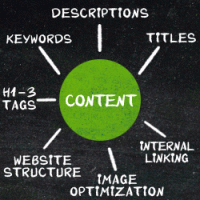
Page Optimization Basics
Some folks would have you believe that the SEO process is a type of voodoo or magic. It is not. In the sixteen years that I have been optimizing sites […]
Manier & Herod, a Nashville Law Firm, Launches New Site
Nashville law firm, Manier & Herod, goes live with their new website.

How To: Use Keyboard Shortcuts
When typing an email, writing a word document, or using the Internet you will likely be performing certain tasks over and over again (e.g. save, copy, and paste). For many of these tasks keyboard shortcuts have been created; they can save you time and keep your hands on the keyboard instead of reaching for the mouse.